
In katalon Studio, to have more control over our Test Case, we are able to mark our Test Case as “Passed” or “Failed”. Another option, there’s a method in Katalon Studio called Failure Handling. As the name implies, it is used to tell Katalon Studio how to handle a failure, meaning if our test step has failed to execute or has encountered an error. “Mark as Passed/Failed” and “Failure Handling” are used to have more control over our Test Cases, here’s how.
Marking our Test Case as Passed or Failed
To mark our Test Case as Passed or Failed, we need to import the Keyword Util library, then using an if statement, if our Test Case meets a certain condition it will be marked as Passed or Failed. For example, we are trying to find if an element is present or not:
import com.kms.katalon.core.util.KeywordUtil

if (WebUI.verifyElementPresent(findTestObject('Page_Home/lbl_WelcomeMessage'), 10, FailureHandling.OPTIONAL)) {
	//Mark Passed status after this step
	KeywordUtil.markPassed("Element is present")
} else {
	//Mark Failed status after this step
	KeywordUtil.markFailed("Element is not present")
}
There’s actually a third option, which is to mark the Test Case as a “warning”. I have not used this, but I can show you how it works. It works just like before, you can use the syntax:
import com.kms.katalon.core.util.KeywordUtil

KeywordUtil.markWarning("Reason for your warning")
Mark as Passed or Failed in Test Suite Reports
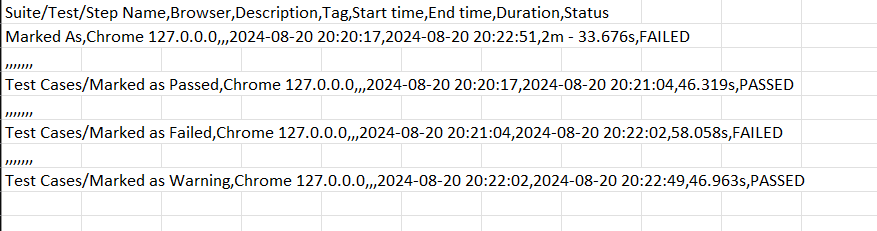
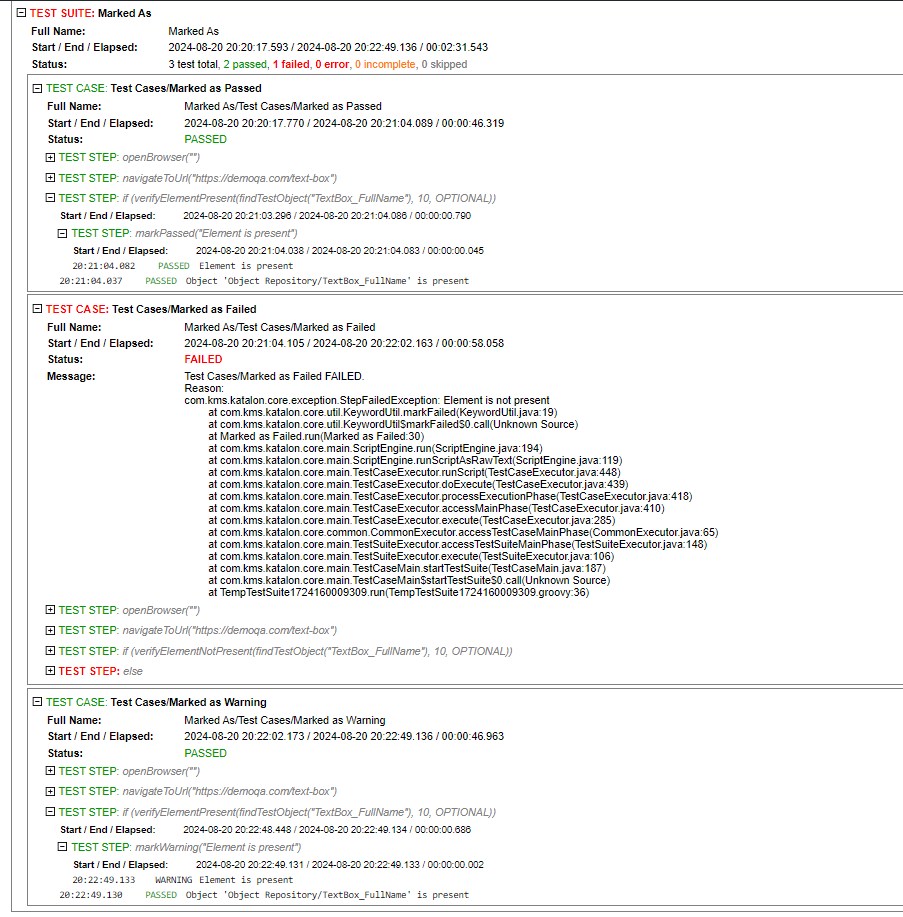
When we run Test Suites, we can generate the test result and saved it as PDF, CSV, or HTML. Let us see if we use “Mark as Passed”, “Mark as Failed”, or “Mark as Warning” in our Test Case, how is the report going to be? Here are the Test Suite report screenshots:
Test Suite report as CSV Summary file:
Test Suite report as HTML file:
Test Suite report as PDF file:

From the screenshots above we can see the difference in our report. Mark as Passed will be counted as a “Passed” step, “Mark as Failed” will be counted as a “Failed” step, and “Mark as Warning” will be counted as “Passed” and can only be seen as “Warning” in HTML report view. Now that we know how it is in our reports, we can use it as we see fit.
Failure Handling in Manual View and Script View
There are three types of Failure Handling in Katalon Studio, which are: Continue on failure, Stop on failure, and Optional. These are each of the syntaxes for example:
WebUI.verifyElementPresent(findTestObject('Page_Login/btn_Login'), 10, FailureHandling.CONTINUE_ON_FAILURE)

WebUI.verifyElementPresent(findTestObject('Page_Login/btn_Login'), 10, FailureHandling.STOP_ON_FAILURE)

WebUI.verifyElementPresent(findTestObject('Page_Login/btn_Login'), 10, FailureHandling.OPTIONAL)
- Continue on Failure: This option allows the test case to continue running even if the step fails. It logs the failure but proceeds to the next step.
- Stop on Failure: This option stops the execution of the test case immediately when a step fails. It logs the failure and halts the test.
- Optional: This option marks the step as optional. The test case will continue whether the step passes or fails, and the result of this step won’t affect the final status of the test.
Failure Handling and Loops
Loops and Failure Handling can be combined, as long as the Failure Handling method can return a boolean value. For example when using verification methods, we type in:
while(WebUI.verifyElementPresent(findTestObject('Page_Home/lbl_WelcomeMessage'), 10, FailureHandling.CONTINUE_ON_FAILURE)) {
    println('Element is present. Continuing loop.')
}
println('Element is not present. Loop exited.')
This code will verify if the element is present or not, and because we set the Failure Handling to “Continue on Failure”, it will always continue until it returns “false” (element not found) and exit the loop. The looping will also work using Failure Handling “Optional” as well:
while (WebUI.verifyElementPresent(findTestObject('Page_Home/lbl_WelcomeMessage'), 10, FailureHandling.OPTIONAL)) {
    println('Element is present. Continuing loop.')
    // Add your loop logic here
}
println('Element is not present. Loop exited.')
The loop will continue as long as the element is present. If the element is not found, the failure is logged but does not affect the test case outcome, and the loop stops.
“Using ‘Stop on Failure’ is not recommended in loops, as it will halt the entire test execution upon encountering a failure, preventing the loop from completing and stopping any subsequent code from running.”